 KitDesk
Borrower records: who actually gets the overdue email
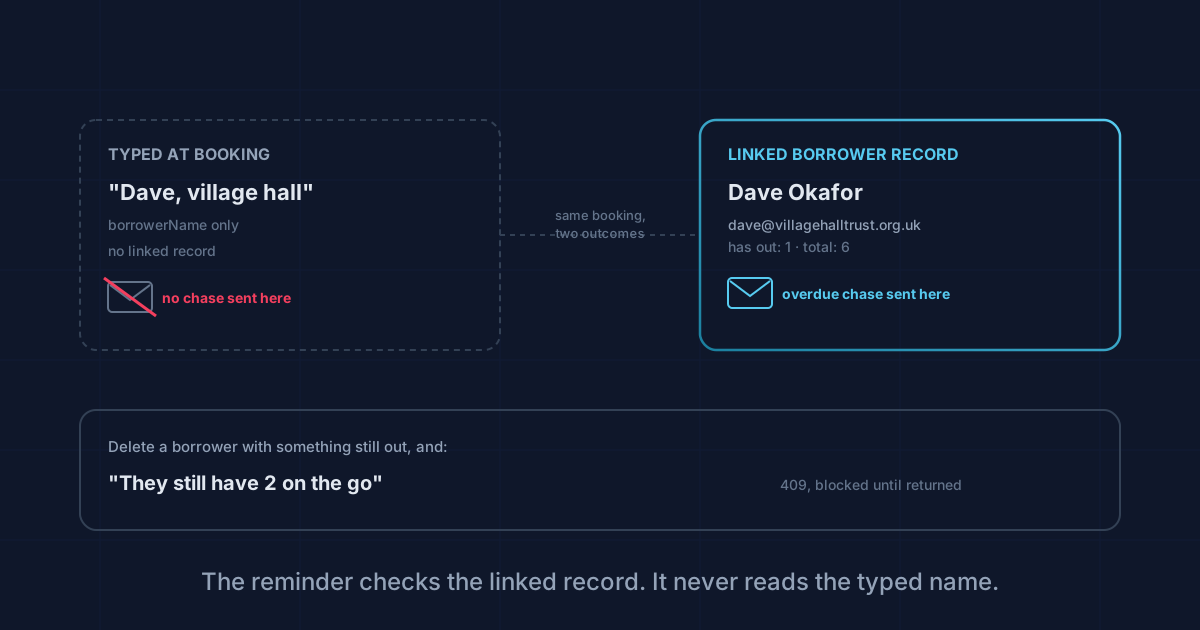
Type a name at booking and it's just text on that booking. Only a linked Borrower with an email address gets the reminder when the kit doesn't come back.
Most of the equipment covered on this site never leaves the building it lives in. A PE department books its own laptop trolley, a caretaker books the minibus, and whoever's late bringing it back is someone with a login and a line manager. Hire firms, churches and clubs don't work like that. Half of what goes out the door goes to someone who's never seen the app: a parent borrowing the PA for a fundraiser, a hirer picking up a gazebo for the weekend. KitDesk has a separate record for exactly that person, and it's worth being precise about what it does and doesn't do, because we found a gap between the two that only shows up when something's overdue.
We read borrowers.js, bookings.js and email.js rather than describe the Borrowers tab from memory.
What a borrower record actually holds
Open Borrowers and add someone: name, email, phone, company, an "ID checked" note, and free-text notes. That's the whole schema. Name is the only required field. The ID note is exactly what it sounds like, a line you type yourself, something like "driving licence seen 10/08/2026". Nothing in KitDesk photographs, scans or verifies an ID. It's a place to write down that you looked at one, not proof that you did.
Each row on the list also shows two counts, worked out live rather than stored: how much that person currently has out, and how many bookings they've made in total. Click through and there's a history, every booking they've ever had, item name and dates, newest first. Useful for the conversation that starts "didn't you have our projector back in March."
Two ways a name ends up on a booking
Here's the part that isn't obvious from the booking form. When someone books an item, KitDesk accepts either a borrowerId, a link to a real record in the list above, or a plain borrowerName string typed on the spot. The server code that saves the booking looks like this:
borrowerId: borrower?._id || null,
borrowerName: borrower?.name || borrowerName || req.user.name,
Both routes leave a name on the booking. A staff member can type "Dave from the village hall" straight into the field without ever creating a Borrower record, and the booking looks complete: a name attached, a date range, an item. Visually there's no difference between that and a properly linked borrower. The gap only opens up once the item is late.
Who actually gets chased
KitDesk runs a daily sweep that emails a reminder the day before something's due, and a chase once a day for anything already overdue. The function that decides where that email goes is short, and it only looks in one place:
if (booking.borrowerId) {
  const borrower = ...;
  if (borrower?.email) return { to: borrower.email, name: borrower.name };
}
const user = ...;
return user?.notify === false ? null : { to: user?.email, name: user?.name };
It checks borrowerId. It never looks at borrowerName. So a booking with a typed name and no linked record falls straight through to the second branch, and the overdue chase lands in the inbox of whichever staff member made the booking, not the person who actually has the kit. "Dave from the village hall" never hears from KitDesk at all. The staff member gets nagged on his behalf, and has to remember to ring him themselves.
This isn't a bug so much as a consequence of the free-text field existing at all. It's there because sometimes you don't want to build out a full contact for a one-off booking, and that's a reasonable thing to want. The cost is that the reminder system silently stops working for that booking, and nothing on screen tells you it has.
Deleting someone who still has kit out
You can't delete a borrower with an open booking against them. The server checks first:
const out = await Booking.countDocuments({ borrowerId: req.params.id, status: { $in: ['reserved', 'out'] } });
if (out) return res.status(409).json({ error: `They still have ${out} on the go` });
Try it and you get told exactly how many bookings are blocking the delete, not just that it failed. Once everything they've had is returned or cancelled, the record comes out cleanly, and their history goes with it. There's no soft-delete or archive step. If you want to keep the history but stop them booking anything new, use the "active" checkbox instead of deleting.
Who sees this tab at all
Borrowers sits behind a brand feature flag, on by default on school-booking.app, and any org running with it off simply doesn't get the tab or the field on the booking form. Anyone signed in can view and search the list; only an owner or admin can add, edit or delete an entry. That split makes sense for a school where a supply teacher might book equipment but shouldn't be rewriting a hirer's contact details, less so if you're a small hire firm where the person on the desk is the only one who ever adds a new customer. Worth a look before rollout if your team is that shape.
The fix for the overdue-email gap is simple once you know it's there: if a booking matters enough that you'd want a reminder to reach the actual borrower, spend the ten seconds linking them to a real record with an email address on it, rather than typing their name into the box and moving on.
Tracking equipment the hard way?
KitDesk does the boring part: labels, bookings, reminders and a list of what never came back.
Try the demo