 KitDesk
What actually happens when someone marks kit damaged
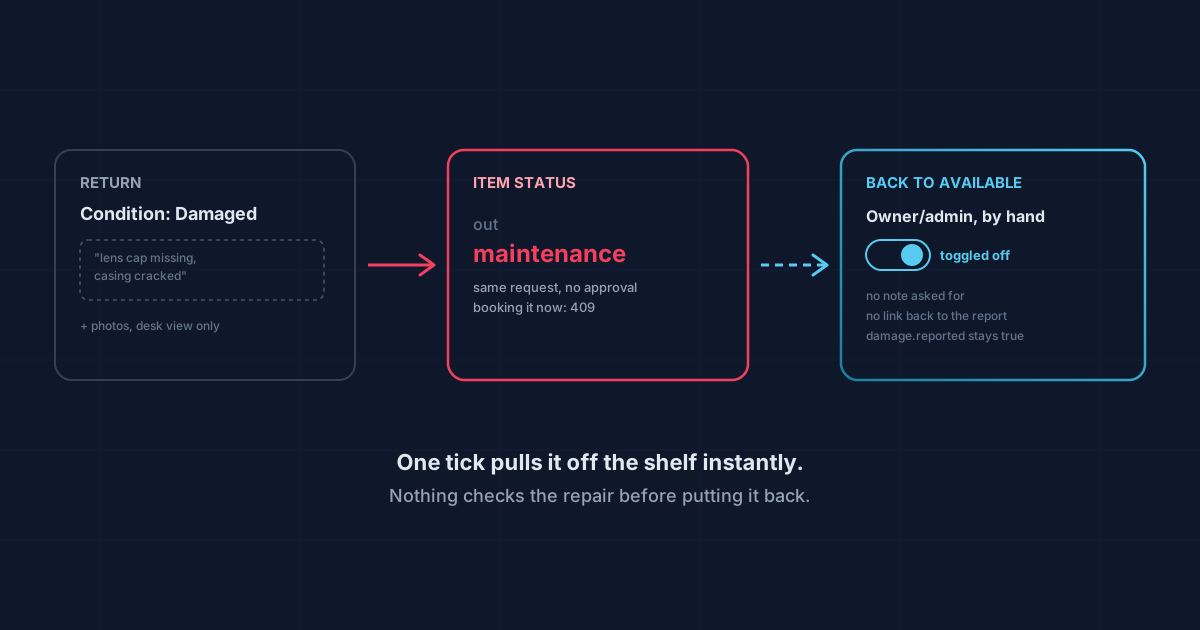
Ticking "damaged" on a return pulls the item off the shelf the same second. Getting it back on takes a person, on purpose, because nothing checks that it was fixed.
Someone brings a tripod back with a bent leg. They tick "damaged" on the return screen, maybe type a line about what's wrong, maybe attach a photo. Then what?
The honest answer is: less than people assume, and it happens faster than people assume.
The moment it flips
Return a booking with the condition set to damaged and two things happen in the same request. The booking gets a damage.reported flag, a timestamp, and whatever notes were typed. And the item's status changes from "out" to "maintenance", immediately, no approval step, no second person needed. It comes off the shelf the instant the return is saved.
That matters because "maintenance" isn't cosmetic. It's a real status the booking system checks. Try to book that item while it's flagged and you get a straight 409 back: "That item is under maintenance." Nobody can queue it, nobody can reserve it for next Tuesday. One tick on a return form and it's out of the pool until somebody puts it back.
Condition actually has three options, not two: good, fair, damaged. Only the third one does this. Mark something "fair" on the way back and it still goes straight to available. That's worth knowing if you were expecting a halfway state. There isn't one. Fair is treated the same as good for booking purposes; damaged is the only condition that pulls stock.
Notes and photos, if the app lets you
On the full desk or laptop view, marking something damaged opens a text box for what's actually wrong, and, if photo uploads are switched on for your organisation, a spot to attach pictures. Both get attached to that specific booking record, not just logged as a generic event, so anyone looking at that booking later sees the note and the photo together, not a bare "damaged" with no context.
The kiosk is a different story. Checking a booking back in at the kiosk gives you two buttons: "Back, good" and "Back, but damaged." That's it. No text field, no camera. If a sixth-former on the kiosk flags a camera as damaged, all the system has is the word "damaged" and a timestamp. The actual detail of what's wrong exists only in whoever's head noticed it, until a member of staff logs into the full app and adds a note to that booking by hand. Worth knowing if most of your check-ins happen at a kiosk rather than a desk: the flag arrives instantly, the useful detail usually doesn't.
Getting it back on the shelf
Here's the part that catches people out. Fixing the tripod doesn't fix its status. There's no "repaired" button tied to the damage report, no workflow that closes the loop automatically. What brings an item back to available is a member of staff (owner or admin, that toggle is role-gated, staff accounts can't flip it) going into Inventory, filtering to "In repair," finding the item, and clicking the maintenance toggle off.
Nothing checks that a repair actually happened first. The toggle doesn't ask for a note, doesn't reference the original damage report, doesn't require anyone to have looked at the photo. It just flips the status field back to available. In practice that's fine. Someone glances at the item, decides it's usable, and clears it. But it means the system has no record of when or whether the fault was actually addressed. The original booking still shows damage.reported: true forever, with no matching "resolved on" date anywhere. If you want that history, it lives in whoever remembers fixing it, not in KitDesk.
The same "In repair" filter is also the only place items in maintenance show up as a group. There's no dashboard count of what's currently damaged that surfaces on the main screen. You have to go looking in Inventory and filter for it, or notice the amber warning triangle that shows next to a booking with damage reported.
Where this leaves you
Reporting damage is quick and it works: mark it, and the item genuinely can't be booked again by accident. That's the useful part, and it happens whether you're on a desk, a tablet, or the kiosk in the corridor.
What it doesn't do is manage the repair itself. There's no queue that tells you what's been sitting in maintenance for three weeks, no reminder to chase whoever was meant to look at it, and no automatic link between "we fixed it" and "it's bookable again". That link is a person clicking a toggle, and only an owner or admin can click it. If a school or a hire firm wants a proper repair-tracking process on top, that's a spreadsheet or a habit somebody owns, not something the app does for you yet.
For most organisations that's the right trade. A camera with a cracked lens shouldn't need three approvals to come off the shelf. It should come off the second someone notices, which is exactly what happens. Just don't expect it to chase the fix. That part's still on you.
Tracking equipment the hard way?
KitDesk does the boring part: labels, bookings, reminders and a list of what never came back.
Try the demo