 KitDesk
Recurring bookings: one booking, or twelve separate ones?
Booking a standing Tuesday for the rest of term makes one request but not one booking. Here's what actually gets built behind it, and where approval catches people out.
Someone in PE takes the ball bag out every Tuesday afternoon, term after term. A laptop goes to the same governor for every Wednesday meeting. A loan device sits with the same student until exams finish. None of that is really a one-off booking, and typing the same three fields into a form forty times a year is exactly the kind of chore that makes people give up on a booking system and go back to a Post-it on the cupboard door.
What "repeat" actually builds
The booking form has a Repeat field: just once, every day, every week, every fortnight, every month. Choose anything but "just once" and a second field appears asking how many times, capped at 52, roughly a school year of weekly Tuesdays.
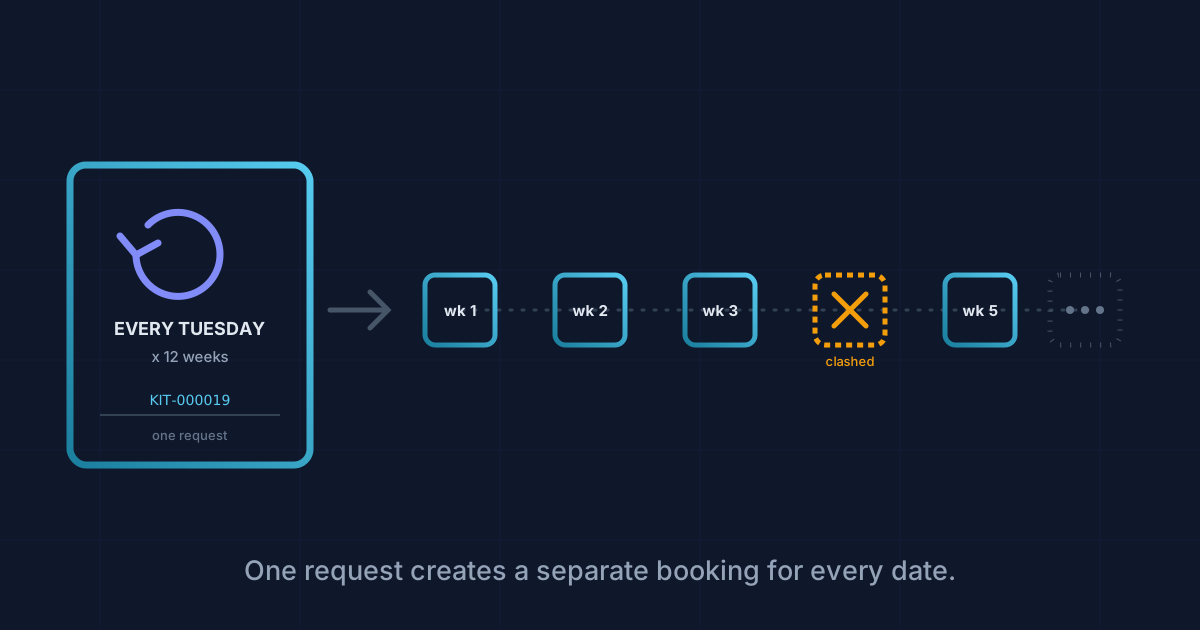
Submit it and KitDesk does not create one booking with a repeating rule attached to it. It creates one booking per date, all at once, up front. Twelve weeks of PE kit becomes twelve separate booking records the moment you save, each with its own start and end time, each checked in and out on its own. What ties them together is a shared series ID sitting quietly on every row — invisible unless you go looking, though the bookings list does show a small repeat icon next to anything that belongs to one.
That matters more than it sounds. A series is not one thing that gets approved, checked out or returned as a block. It is a list of individual bookings that happened to be created together, and everything downstream treats them exactly as it would treat forty coincidentally identical one-off bookings.
Why one week can fail while the rest go through
Each date in the series is checked against existing bookings for that item, on that date, on its own. If the rugby balls are already booked to someone else on week 6, week 6 gets skipped and the other eleven still go ahead. You find out afterwards how many were created and how many clashed, rather than the whole request failing over a single date. For items with more than one in stock, say a class set of tablets, a clash only counts once every unit already committed for that date, since KitDesk checks against how many you actually hold, not just whether the item exists.
If a hire firm loans kit on a standing weekly account rather than a one-off charge, each occurrence prices itself too. A PA rig booked for eight sessions runs the day-rate calculation eight separate times, not once for the whole run, which is correct if you bill per hire but worth knowing if you were picturing a single invoice line.
Skipping a single week
Half-term happens. Cancel the item from the bookings list and KitDesk asks whether you mean that one date or the whole run: "Cancel the whole repeating series? Cancel just this one by choosing cancel." Say no to the series question and only that week disappears; the rest of the standing booking carries on untouched. That is the right default for a term-time pattern. The exception is the rare case, and it should cost one extra click, not a rebuild of the whole series.
Where it needs watching
Two things are worth knowing before you lean on this for anything that needs sign-off.
The first is approvals. If your account requires staff bookings to be approved, a recurring request creates a requested booking for every single date, but only one email goes out, for the first date in the series. An admin who approves that email and moves on has approved one Tuesday out of twelve. The other eleven sit in the requests queue, each needing its own individual approve or decline, with nothing to batch that decision and nothing pushing anyone back to check. For a term-long series that is eleven clicks an admin has to remember to make off their own back. If approvals and repeat bookings are both switched on, someone genuinely needs to open the requests tab on a schedule, not wait for the inbox to remind them.
The second is compliance. An item with an overdue PAT test or service date is blocked from being booked at all, and that check runs once, against today's date, when the series is created. It does not run again against each future occurrence. Book a projector every Tuesday for the next six months and the system checks whether it is in date today; it will not stop week 20 going ahead just because the certificate expires in week 15. The block that keeps expired kit out of someone's hands only fires at the moment you press save on the series, not at the moment each individual booking would actually go out. Anyone using recurring bookings for equipment that gets tested annually should still be checking the compliance list on its own terms, not assuming the booking form will catch it partway through a run.
Setting one up sensibly
Pick the frequency that matches the actual pattern rather than the tightest one on offer: weekly for a standing lesson, fortnightly for an alternating rota, monthly for a governors' meeting. Set the count to the length of the real commitment, half a term or a full year, rather than maxing it out from habit. A stale series still running three years on with nobody able to say why is its own kind of clutter. And where approvals are on, treat the requests queue as something to check deliberately, not something that chases you, because past the first email a recurring booking will not do that chasing on its own.
None of this is a reason to avoid it. Booking forty near-identical dates one at a time is worse on every count that matters: more chances to get a date wrong, more time spent, more temptation to just not bother. It is just not one lever you pull once and forget about. It is forty small levers pulled together at the same time, and a couple of them behave slightly differently from what the single "repeat" button implies.
Tracking equipment the hard way?
KitDesk does the boring part: labels, bookings, reminders and a list of what never came back.
Try the demo