 KitDesk
Due-back emails: one warning, then a chase a day
The warning goes out once and is never repeated. The chase repeats daily, but only for kit that was actually checked out, which is the gap that catches people.
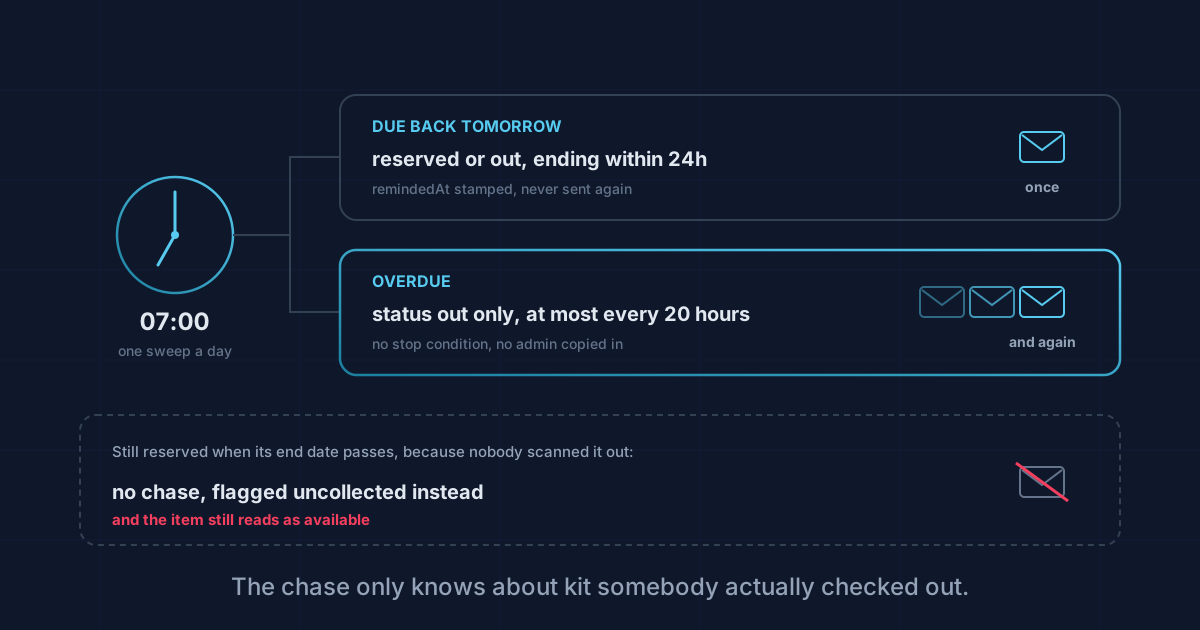
KitDesk sends two emails about a due date. One warning the day before, and one chase a day once something is late. Between them they cover most of what goes wrong. There is also a specific kind of booking that gets neither, and it is worth knowing which one before you rely on the emails to do your chasing.
One sweep a day, at seven in the morning
Both emails come out of the same job. A timer wakes every thirty minutes, checks whether the hour has passed SWEEP_HOUR (seven by default, server time) and whether it has already run today. If the hour has passed and it has not run, it runs.
So everything is decided once a day, in one pass, in the morning. Nothing is sent when a booking is made. Nothing is sent at the moment a due date goes by. If a booking falls due at half past ten this morning, the sweep that might have warned about it finished three hours earlier.
The "already run today" flag lives in memory, not in the database. Restart the server at nine and it forgets, so the sweep runs again that day. It does no harm, because the guards against repeat emails sit on each booking rather than on the scheduler, so the second pass finds nothing to do.
The warning: once, and only once
The first email says an item is due back tomorrow. To get it, a booking has to be reserved or out, have an end date in the next twenty-four hours, and have never been reminded before.
That last condition is permanent. Once the warning goes out, remindedAt is stamped on the booking and the query never picks it up again. There is no second warning on the morning the thing is actually due, and no way to re-arm it short of editing the database.
The twenty-four hour window has a hole in it that comes up more often than you would expect. Book something at eleven this morning to come back at four this afternoon, and the sweep has already been and gone. Tomorrow morning the end date is in the past, and the query only wants end dates in the future, so it is never picked up. Same-day bookings made after the sweep hour get no warning at all. For an hour-long loan of a camera that is fine. For "take it for the afternoon" it means the first email anyone sees is the overdue one, the following morning.
The chase: every day, to one person
Once something is late the second email starts. It says how many days late, rounded down with a floor of one, and it goes again every day until the booking stops being late.
The gap between chases is twenty hours rather than twenty-four. That looks like an odd number until you picture a sweep that runs at 07:05 one day and 07:02 the next. At a flat twenty-four hours the second one is three minutes early, skips, and the daily chase quietly becomes every other day. Twenty hours gives it room.
There is no stop condition and no escalation. A booking that is out and overdue is chased every morning indefinitely, and the chase goes to the borrower, or to the person who booked it, and nobody else. No admin is copied on the tenth one. If you want somebody senior to know that a £2,000 camera has been out for three weeks, that lives on the overdue list on the dashboard, and somebody has to go and open it.
One more thing about the recipient. A staff member can switch their notifications off and stop receiving any of this. An outside borrower has no such setting, and the emails carry no unsubscribe link. If you are chasing parents, contractors or hall hirers, you are emailing people who cannot turn it off, which is an argument for closing bookings promptly rather than for a new field.
The booking that never gets chased at all
Here is the one worth writing down. The chase query asks for bookings with status out. Not reserved, not requested. Just out.
A booking only becomes out when somebody checks it out. If a member of staff books a laptop for Friday, lifts it off the shelf without scanning it, and never comes back, that booking sits at reserved forever. Its end date passes, and no chase is ever sent.
That last part is deliberate. The item might be in a car boot and it might be on the shelf, and nothing in the record can tell you which, so a daily email saying a laptop is nine days late is a guess dressed as a fact. These bookings are flagged uncollected instead: counted on the dashboard, listed under "never checked out", and coloured amber rather than the red used for genuinely late kit. Overdue means somebody has it and is late. Uncollected means nobody knows, which is a question for whoever can go and look at a shelf, not something to email at a borrower.
The item side is worse. Status only flips to out at check-out as well, so as far as stock is concerned that laptop is still available and still on the shelf. Somebody can book it again.
The one email that booking does get is the due-back warning, because that query does include reserved. So the pattern to recognise is a single reminder followed by silence, on kit nobody ever scanned out. The silence is not the system deciding everything is fine. It is the system having no idea the item ever left.
There is a related quirk in the other direction. Check-out does not look at dates at all: it checks the booking is reserved rather than awaiting approval or already gone, and that is the whole test. Check something out a fortnight after its end date and it is overdue immediately, chased from the next morning.
Nothing tells you an email failed
Mail goes out through Brevo. With no API key configured, the send writes a line to the log and reports failure, which is deliberate: a deployment with no mail set up still has to work.
The part to be aware of is what happens next. Sending is fire and forget. The sweep calls it, does not wait for an answer, and stamps remindedAt or chasedAt on the booking either way. A reminder that never left the building, because the key is missing or Brevo has not verified the sender address, still marks that booking as reminded, and it will never be picked up again.
A booking showing as reminded means the sweep reached it. It does not mean anyone received anything. Overdue chases at least leave an email.sent entry on the item's history, so there is a trail to read afterwards. Due-back warnings are not logged at all.
If you have just set this up, the honest test is to make a booking due tomorrow, wait for the morning sweep, and look in an inbox. There is no send-test button and no delivery indicator anywhere in the app.
What the reports make of it
Two notes, since overdue kit feeds the numbers.
The value at risk figure adds up everything with status out, so genuinely overdue kit does show there as money.
The on-time rate does not work that way. It is calculated from bookings that came back: of everything returned in the window, what share arrived by its end date. Something still missing is not in the denominator, because it has not been returned. The longer a piece of kit stays gone, the less it touches your on-time percentage, and on the day it finally turns up six weeks late the figure gets worse. A falling on-time rate can mean things are coming back late, or it can mean old losses are being cleared up. There is more on what those figures count in utilisation reports.
Four things worth doing
Check the sweep hour suits you. Seven in the morning is server time, and if your server is not on UK time, that is not the seven you had in mind.
Make sure the borrower is a linked record with an email address rather than a typed name, because none of the above reaches anybody otherwise. That is covered in borrower records.
Work the uncollected list, and treat it as a different job from the overdue one. It is the only place "nobody actually knows where this is" shows up, and the only thing that clears it is somebody going to look.
And insist on the scan at check-out. Every email in this article depends on that one action having happened.
The chasing is good at kit the system knows is out. It is no help at all with kit that walked off a booking nobody ever completed, and that is the harder half of the problem.
Tracking equipment the hard way?
KitDesk does the boring part: labels, bookings, reminders and a list of what never came back.
Try the demo