 KitDesk
Printing QR tags: what the code actually holds
A KitDesk tag encodes one thing, the item's reference, nothing else. That single fact decides what a random camera app shows you, and what happens if you delete an item and let its number get reissued.
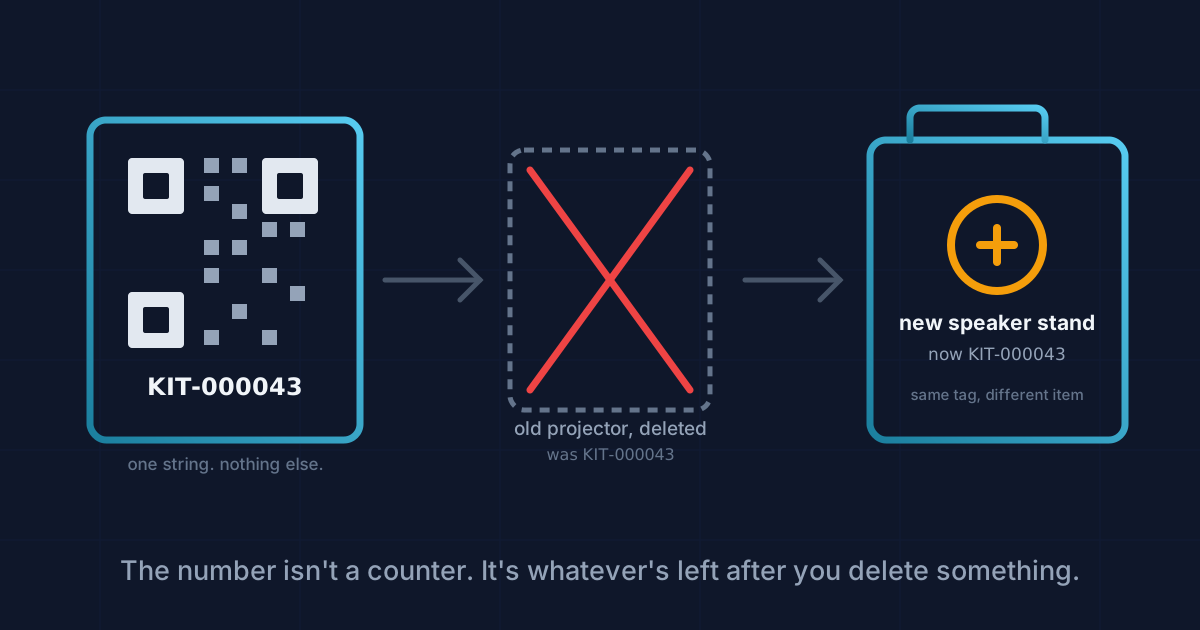
Open the QR Tags screen and it pulls in every item in your inventory, ticks all of them, and shows a grid of printable labels. Hit print, and you have a sheet of tags ready for a laminator. That part is straightforward. What is worth fifteen minutes of your time is understanding what those little squares actually contain, because it is less than most people assume, and it has one consequence that will only bite you once you have deleted something.
What's inside the square
Nothing clever. The server generates each tag with one line:
QRCode.toString(item.ref, { type: 'svg', margin: 1, width: 240 })
That's it. Not a URL, not a link back to your KitDesk account, not JSON with the item's name or category. Just the reference string itself, something like KIT-000042. Scan one with your phone's ordinary camera app, the one everybody already has open, and you get a grey banner offering to search the web for the text "KIT-000042." Nothing happens. No page opens. That's expected, not broken.
The tag only means something inside KitDesk. Scan it from the kiosk sign-out screen, or from the scan button on the ordinary Inventory page, and the app looks the reference up against your own items and shows you the record. Outside that context it is a six-character string printed on a sticker, no smarter than a shelf number.
If your school or hire firm has ever tried to use a general-purpose QR reader app to build some parallel spreadsheet from these tags, it will not work, because there is nothing in the code to read beyond the reference itself. Anyone doing that has to type the reference in by hand, same as if there were no QR code at all. The value is entirely inside KitDesk's own scanner, not in the QR standard.
How a reference gets its number
Every item gets a reference on creation, built from a prefix set per brand (KIT by default, different for a white-labelled deployment) plus a six-digit number padded with zeros. The interesting part is how that number gets picked. There's no counter stored anywhere. Instead, each time an item is created, the server looks at every item already in that organisation, sorts by reference, takes the highest one, and adds one:
const last = await Item.find({ orgId }).sort({ ref: -1 }).limit(1).lean();
const digits = last.length ? Number(String(last[0].ref).split('-')[1] || 0) : 0;
return `${brand.refPrefix}-${String(digits + 1).padStart(6, '0')}`;
Ninety-nine times out of a hundred this works exactly like a counter would. But it isn't one, and the difference shows up the day you delete the item that happens to hold the highest reference. Say your last three items are KIT-000041, KIT-000042, and KIT-000043. Delete KIT-000043 because that projector finally gave up. The next item you add doesn't get 000044. It gets 000043 again, because the server only ever looks at what still exists, not at what has ever existed.
That matters because the label on the old projector's box, the one still stuck to a shelf or a flight case somewhere, was KIT-000043. If that physical tag is still around and someone scans it, they'll now pull up a completely different item. The database doesn't know the two things ever shared a number. Nothing in KitDesk warns you this happened, because from the server's point of view nothing went wrong, it just did exactly what the function says.
In practice this only bites you if you delete items rather than marking them retired or disposed, and if the old sticker survives the item's removal. Neither is unusual. A dead projector often goes in a skip with its label still on. The fix is not a code change so much as a habit: if you delete an item, either peel the tag off whatever it was stuck to, or write the reference down somewhere before you bin it, so a stray scan months later doesn't tell you a lie. It is the same discipline behind a proper stock-take: the record is only trustworthy if what is physically on the shelf still matches what the system says is there.
The print screen itself
Everything in your inventory shows up selected by default, so printing the whole set is one click. Deselecting is a second click per tile, which is fine for reprinting one or two labels and slow if you need forty specific ones out of three hundred. Unlike the main Inventory page, this screen has no search box and no category filter, only "All" and "None." Finding six items among two hundred means scrolling and reading names off the grid, the same way you'd hunt through a printed catalogue.
Each visible tag is a separate QR fetched from the server as its own request, one per item, rather than a single batch call. For a modest inventory that's invisible. For a few hundred items it's why the screen sits on "Generating codes…" for a moment before anything appears.
There's no PDF export. Printing runs through the browser's own print dialog, with CSS rules that hide the sidebar and header and tell each tag not to break across a page edge. That's a perfectly normal way to produce a label sheet, but it does mean "save as PDF" is a browser feature you're borrowing, not something KitDesk offers directly, and layout tweaks (a different label size, more per row) mean editing print CSS rather than picking an option on screen.
Where the printed tag actually earns its keep
None of the above is a reason to skip printing tags. It's a reason to know what you're relying on. The QR is a fast, reliable way to hand a reference to KitDesk's own scanner without anyone typing six characters correctly under pressure at a cupboard door. That's a real saving on the day. It just isn't a portable, self-describing barcode that means anything to a system other than yours, and the number on it isn't guaranteed to stay attached to one physical item forever if things get deleted along the way.
Print the sheet, laminate it, stick it on. Just don't throw an old tag straight in the bin with the item still attached if there's any chance someone will scan it later expecting the original.
Tracking equipment the hard way?
KitDesk does the boring part: labels, bookings, reminders and a list of what never came back.
Try the demo