 KitDesk
The kiosk loses wifi mid-signout: what happens to that booking
The kiosk queues checkouts and returns locally when the connection dies, then replays them once it's back. Here is what that actually covers, and what it does not.
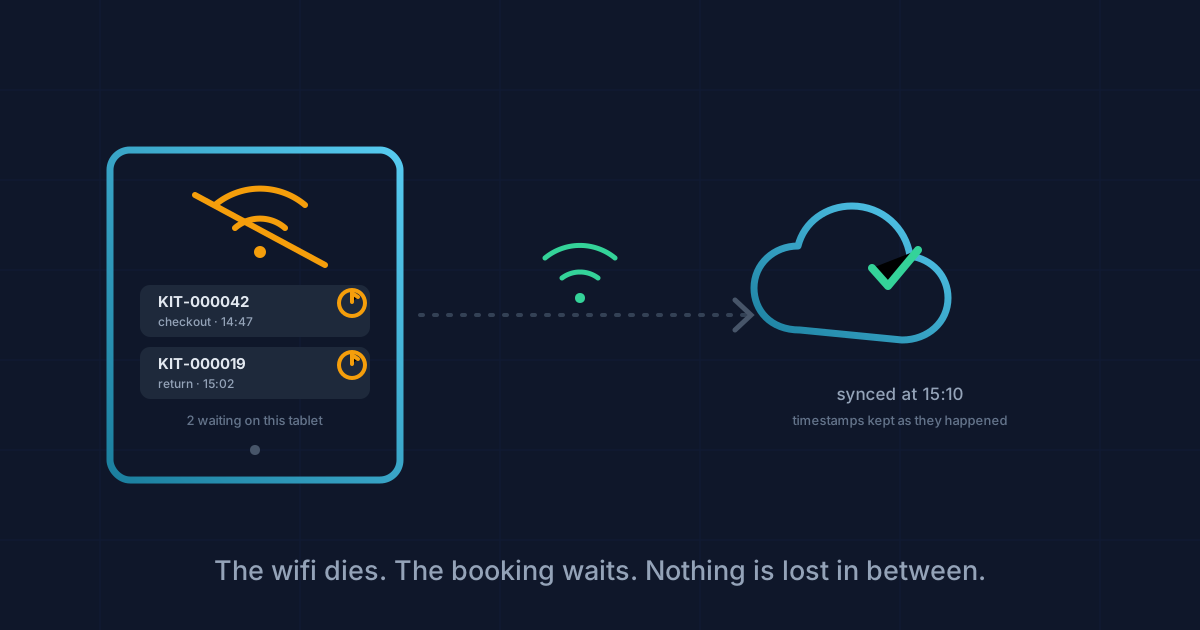
Somebody scans a drill out of the store cupboard, the tablet spins for a second, and the wifi picks that exact moment to die. That's the actual test of whether kiosk mode is worth trusting. Not whether the QR scan works. Whether the booking survives the thirty seconds after it.
We went and read the code rather than guess, because this is the kind of feature that's easy to claim and easy to get wrong.
What the tablet does the moment the request fails
KitDesk's kiosk mode (the PIN-entry tablet by the cupboard, separate from the normal login) keeps a queue in the browser's own local storage. When a checkout or return request fails, the app has to decide whether that's a dead network or a real refusal, and it does that by checking two things: whether the browser itself reports offline, and whether the failure came back as a proper answer from the server at all. A "that item's already out" response is a real answer. A request that never gets one, because there's nothing to talk to, is not. Only the second kind gets queued.
That distinction matters more than it looks. If the tablet queued every failure, a genuine rejection (someone trying to check out something that's already gone) would sit retrying forever instead of telling the person straight away. If it queued nothing, a dropped connection would just fail the way it does on a lot of kiosk software: an error, and the item still shows as sitting on the shelf when it's actually walking out the door.
What actually gets stored is the action itself (checkout or return, the item reference, where it's going, how long for) plus the moment it really happened, not the moment it eventually reaches the server. That timestamp travels with the queued entry. It's the same field the server uses later when it finally processes it, so a booking that started at 2:47pm during a wifi outage still says 2:47pm once it syncs at 3:10, not 3:10.
The person at the tablet doesn't see any of this. The screen tells them the same thing it would if the network were fine, "the drill is yours until 4pm", plus one line added: saved on this tablet until the connection's back. They walk off with the kit. The system just hasn't told anyone else yet.
What happens when it reconnects
The tablet listens for the browser's own "back online" event and fires a sync the moment it hears one, plus once more when a new PIN session starts. There's also a small badge in the header showing how many actions are waiting, and tapping it forces a sync by hand rather than waiting for the browser to notice.
The server takes each queued action in the order it was sent and replays it exactly as if it had arrived live, using the stored timestamp rather than the arrival time. Up to two hundred actions in one go, which is a limit nobody on a single tablet is likely to hit. You'd need the wifi down for a genuinely long stretch and a busy cupboard to get anywhere near it, but it's there rather than unbounded.
Not every queued action lands cleanly, and this is where it gets honest rather than tidy. If two people are working the same item from two different tablets, or someone checks it out through the ordinary booking screen while the kiosk is offline, the queued action can arrive to find the item already marked out. The server rejects it, correctly, because the item genuinely isn't available, and the action is dropped rather than retried. The kiosk shows a count: "1 queued action was rejected on sync." It does not say which item. Whoever's watching the tablet has to notice something doesn't match and go looking, because the message alone won't point them at it.
Where it doesn't reach
Two things worth being straight about, because the feature is easy to overstate.
First, the queue lives in that one tablet's browser storage and nowhere else. Nothing gets written to the server until the sync call succeeds. Clear the site data, reset the tablet, or swap it for a spare mid-shift, and whatever was queued is simply gone. There's no second copy anywhere to recover it from. For most cupboards this never bites, because the outage is minutes and the tablet stays put. It's still worth knowing before you're the one explaining a missing checkout to a PE teacher in October.
Second, this only exists in kiosk mode. The ordinary dashboard, where staff book and manage kit from a browser or the app, has no equivalent queue at all. If your connection drops while saving a booking there, the request just fails, the same as most web software. The tablet by the cupboard door is the one place KitDesk was built to expect the wifi to be unreliable. That tracks: it's usually the tablet furthest from the router, propped on a shelf in a sports hall or a storeroom nobody ran an ethernet cable to.
The setting exists to be turned off, too. Each deployment can disable offline queueing entirely, so a rejection or a dead connection just shows as an error and nothing gets deferred. If you'd rather a failed checkout stop someone in their tracks than get smoothed over and sorted out later, that's a one-line change, not a redesign.
None of this replaces someone checking, once a week, that what the shelf says and what the tablet says still agree. It just means a dropped connection during the thirty seconds someone's actually stood at the cupboard isn't the thing that breaks that agreement.
Tracking equipment the hard way?
KitDesk does the boring part: labels, bookings, reminders and a list of what never came back.
Try the demo